In Elul, everyone is tasked to make a Cheshbon HaNefesh of what they really need in terms of the internet. Taking even a small step towards better protection can be a huge zechus for you and your family!
Recommendations, from best to least:
1. In the best situation, you wouldn’t have internet; the dangers far outweigh the benefits. Indeed, our first recommendation is: REMOVE THE INTERNET ENTIRELY.
One of the side effects of COVID is that many people who never had internet started to use it in their homes. Reassess, carefully…do you REALLY need it? If not..the best protection is to “pull the plug” before it is too firmly ingrained in your home.
2. If that is simply not possible, we strongly recommend that you contact the Technology Awareness Group (TAG) in RBS, run by Gra member, Sender Schwartz. TAG specializes in determining your needs and installing safeguards on your devices to keep you running while keeping the internet as clean as possible. Contact Sender at sschwartz@tag.org
3. The next step down is to only allow very well-filtered internet: Either install Techloq on every device or bring only “pre-filtered” internet into your home and devices. NetFree or Internet Etrog (and less so, Rimon) provide this service for your whole home and for all devices. Together with this, we highly recommend adding WebChaver accountability, described below. Filtering always leaves holes, and adding accountability is a great plug for those holes.
4. The minimum that is required for safer internet is a combination of WebChaver accountability together with the WebChaver filter. This combination provides the minimal filtering that is expected of our Kehilla.
NOTE: This level is not recommended if you have children at home with unrestricted use of connected devices or anyone else with a propensity to seek out improper sites. If that is the case, then you require a stronger device filter such as Techloq along with WebChaver accountability, in the previous level.
This Kehillas HaGra initiative is meant to help you along the way to any of these choices. Anything you do, now, is better than doing nothing!
Are there other options? Yes, there are options for email only, like NetFree, and there are other great filters, too. The TAG office can share the best solution for you.
Over the coming months, we will בלי נדר send out more information regarding protecting specific devices and other tips to enhance your protection while still keeping you productive. In the meantime, we have prepared the information below regarding the WebChaver Accountability and Filtering services.
What is WebChaver Accountability?
No one wants to go to internet places that they shouldn’t. When you enroll in WebChaver, a trusted Chaver is always at your side on your computer/phone. Your “safety” is in knowing that if you click something you shouldn’t, you will be accountable to your Chaver to explain it, so you’ll think twice before clicking. This extra guard is what the program is about.
The WebChaver Accountability program should be installed on every device (yours, your spouse’s, your kids’, etc.). It takes random screenshots and sends those to a Chaver who you appoint. It will not slow down your speed, at all (see below)!
The Chaver should be someone who will ask you why you needed to access that site. This can be a spouse, chavrusa, Rebbe, or frankly, if you can’t find someone, we have people who are willing to do that part for you, too!
This Gra initiative makes it easier than ever to use WebChaver. Simple enrollment, a great price, and a top-notch support system. We can even help set you up with a Chaver!
This system is not a form of parental control; that is something that only open communication (and a strong filter) can do. As we wrote above, if you have children at home, WebChaver alone is NOT enough to protect those children. You need a strong filter, too, as described in level 3 and higher, above.
Ready to Join?
Sign up at https://webchaver.org/signup.php
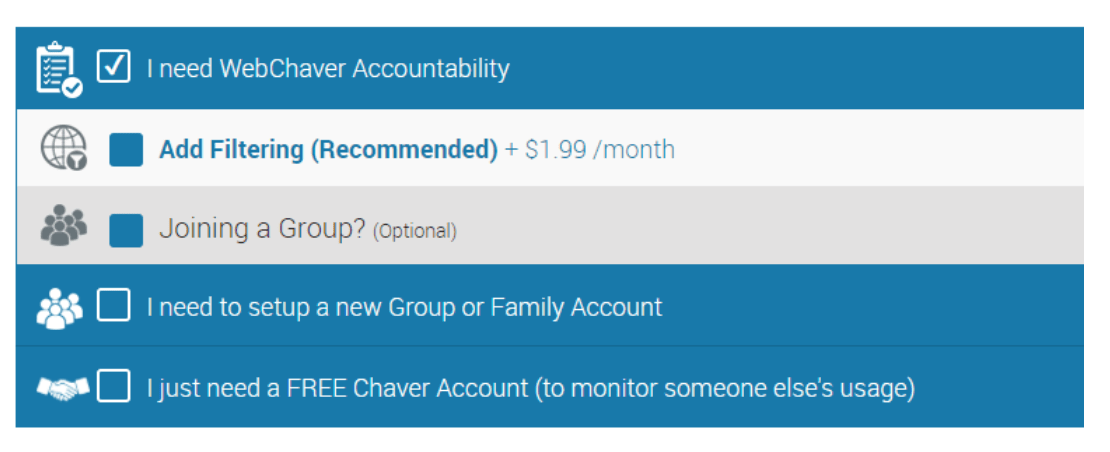
After entering your information, select I need WebChaver Accountability.
(Optional) Select Add Filtering if you are adding it.
Don’t join any groups during signup. If you plan to create more than one account, then also choose the Setup Family Account option.
3. On the payment page click Enter Coupon and use coupon: grarbs
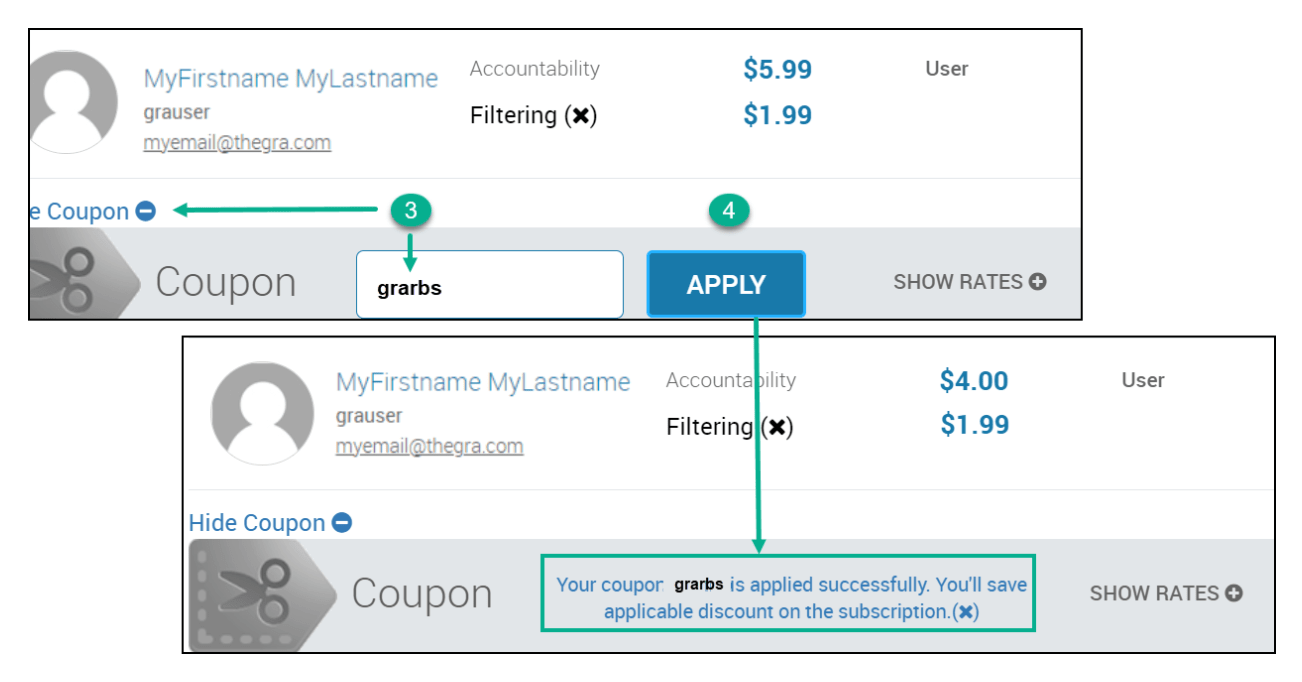
Click Apply to get the special discount.
Once registration is complete you will be provided with download & installation instructions for your computer and mobile devices. Please note that the application you are installing is called Covenant Eyes which is the underlying system that WebChaver uses.
You probably have questions! Read the Q&A below. For any additional comments, questions, feedback, or suggestions about this Gra initiative, send an email to grarbs@webchaver.org
Questions about WebChaver
Q: Does WebChaver slow down my internet speed?
The accountability service does not slow down your internet. It simply takes pictures. The optional WebChaver filter should also not slow down your internet.
Q: Does WebChaver reduce my access to sites?
The accountability monitoring does not limit access to anything. It only takes pictures. If you add a filter, that will (and should) reduce access to certain sites.
Q: I need access to certain sites for my parnassah. Can I still use your filter?
Yes. The filter should only restrict known bad sites. If necessary, you can add needed sites to an “allow list.”
Q. I don’t want other people (even my Chaver) to see my emails or other personal information?
Of course! WebChaver takes privacy very seriously. All screenshots are blurred on the device before being included in the report. While the blurred images are discernible enough to recognize any problematic content, all text is made completely illegible ensuring that all your information and communication remains completely private.
Q: How much does this cost?
The Accountability program is $4.00 a month (that’s more than 30% off of the regular price!) for one user. Several family members can use the same user, even on multiple devices, at this one low cost. Their reports will all be together. (See the next question below for more info)
If you would like to see separate reports for separate users, you will need to purchase a separate user for an additional $3.00 monthly per user. Send us a message and we’ll explain how that works.
To add the WebChaver filter, add $2.00 a month for that. Remember, the best solution is both a filter and also accountability.
Q. My family has multiple devices. Should I use one account or separate ones?
You can use one account for everyone. Everyone’s device will get pictures taken, then you can see the details to determine from which device the screenshot came.
If you want to understand where individuals are spending more of their time, then we recommend one account per family member.
Q: If I have a filter, why do I need accountability, too?
Even if you have a strong filter, accountability adds the dimension of “responsible” vs. hefker internet use. Accountability can train the user to use the internet with caution as opposed to clicking away until you “hit a wall” i.e. the filter. In addition, accountability can warn about time-wasting sites as well as for offline content, which filters cannot protect against. If someone’s friend gives them a movie on a disk-on-key, a filter won’t know, but it can be picked up with accountability.
Q: If I have accountability, why do I need a filter?
Unfortunately, the internet is full of hidden traps. One may click on what they believe to be an innocent link and end up somewhere far from that. Basic filtering will prevent those mistaken clicks while still giving you the freedom of movement you may need. (If you don’t need “open internet”, then get a strong filter instead!). Also, accountability is based on the user caring that others will see. Not all people (kids, in particular) may care.
Q. Is the WebChaver filter different from other filters?
The WebChaver optional filter is not designed to be used as a standalone filter but as an add-on to the primary protection of Accountability. As such it only blocks known bad sites and not specific site content or images, making it less invasive and less restrictive. If you are able to “lock down” your device to stronger protection with another filter then that is preferable (for example with Esrog, Rimon, NetFree, or Techloq).
Q. Do I need a Chaver when I sign up?
No. You can create your account and start using the system. We will remind you to add a Chaver later.
Q: I don’t know anyone who can be my Chaver?
We have great options for this! You can add Moshe Gottlieb (gotters@gmail.com) or Aryeh Sonnenberg (aryehsonnenberg@gmail.com). Just add them on the Chaver page at webchaver.org once you have signed up. No need to ask them first.
Q: I would be more comfortable with a Chaver who doesn’t know me. Can you help?
Sure. You can use an anonymous chaver by adding chaver@webchaver.org Someone from outside of the Gra will then be your Chaver. But we do recommend using someone who at least knows you, and ideally understands you!
Q: Who can I contact for general questions about this program
Be in touch with WebChaver support – support@webchaver.com
Q: Is there any time commitment?
Absolutely not. There is a 30-day, money-back guarantee, and after that, you can stop at any time. Your subscription will be canceled and no additional payments will be charged.
Q: Can I use an Israeli or other non-US credit card?
Yes, you can pay with any credit card that can be billed in US dollars. The “Bank” payment option is for US banks, only.
Q: I don’t have a credit card. Can I still join?
Contact admin@webchaver.org to see how payment can be arranged.
Q: Even these great prices are too much for me. Is there another option?
In certain cases, WebChaver can provide sponsored accounts. Contact admin@webchaver.org. And if anyone would like to sponsor accounts for Gra members who can’t afford it, please contact us at grarbs@webchaver.org.
Q: Who can I contact to get support or hand-holding for installation issues?
We are dedicated to making this work for you!
Send an email to daniel@webchaver.org and Daniel will help. If you send a phone number, he can call you, too.
Q. Does the system work on all devices?
It works great on computers (Windows or Mac) as well as almost all Android devices. On iPhone and iPad, the usage is a little more limited. You need to lock down these devices using the built-in Apple Screen Time settings and then be sure that all internet use is through the Covenant Eyes/Web Chaver browser (not Safari). All instructions are available at webchaver.org or contact us.
Q: What if my job (e.g. web development or similar) makes it impossible to work with any filter?
There are rare cases where a person may simply not be able to carry out their jobs due to a filter’s interference with the software code behind the web page. In such a case, it is strongly recommended to at least install WebChaver for accountability only. Accountability will not affect the html/js/css or images on the page in any way, allowing people to carry out their assignments without impedance.